Less paperwork.More teaching.
SKTA grades against your rubric, prepares lessons and exams, reviews theses and scans paper — with an AI that runs on your own computer or phone.
Free 7-day demo, approved personally · Windows, Android and Mac · No card needed
From paper to result
A stack of scripts at four.
Feedback ready by five.
Scan or upload
Point your phone at the paper, or add Word, PDF and PowerPoint files.
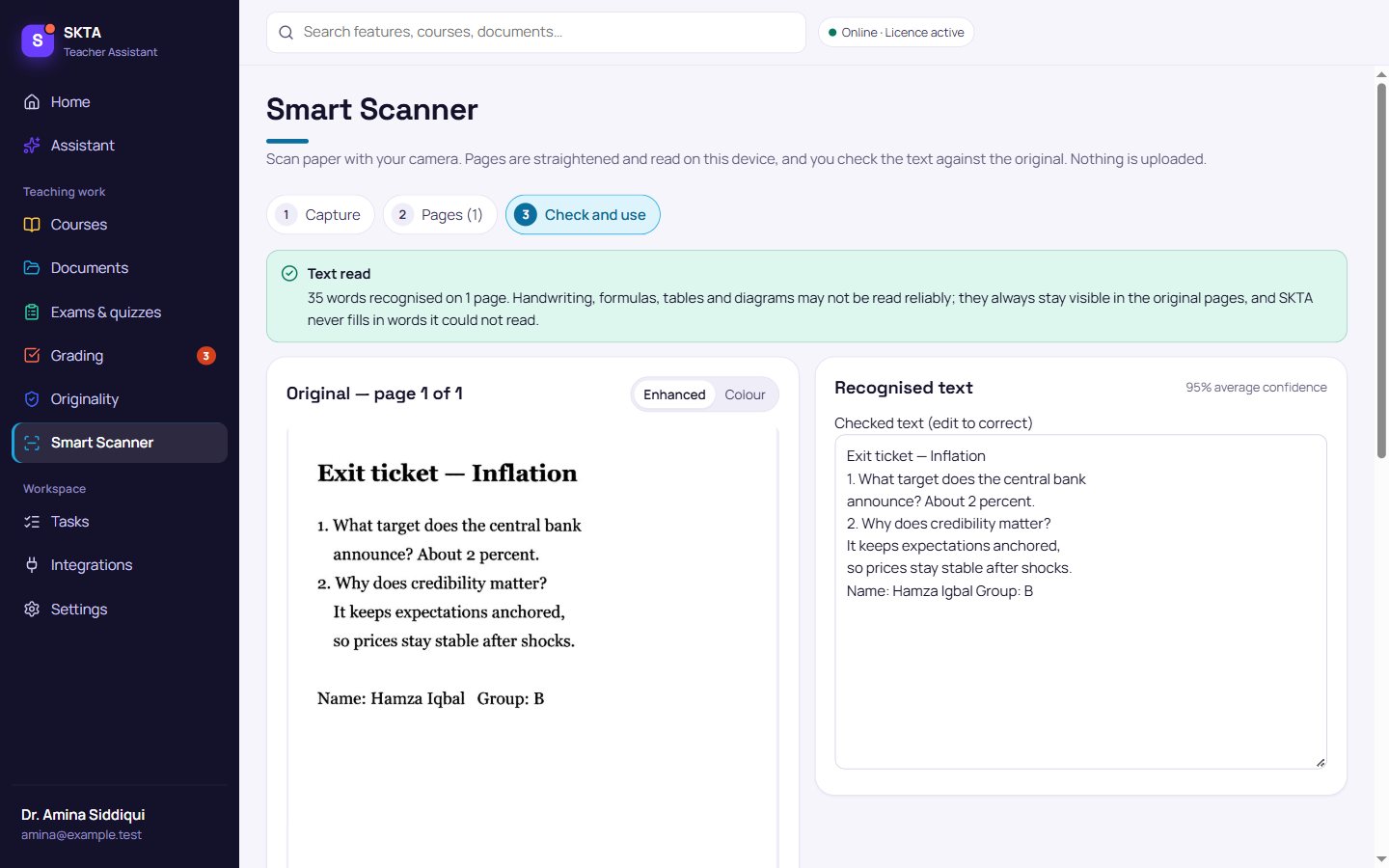
Check what SKTA read
Uncertain words are highlighted next to the original page. Nothing is guessed.
Review the proposal
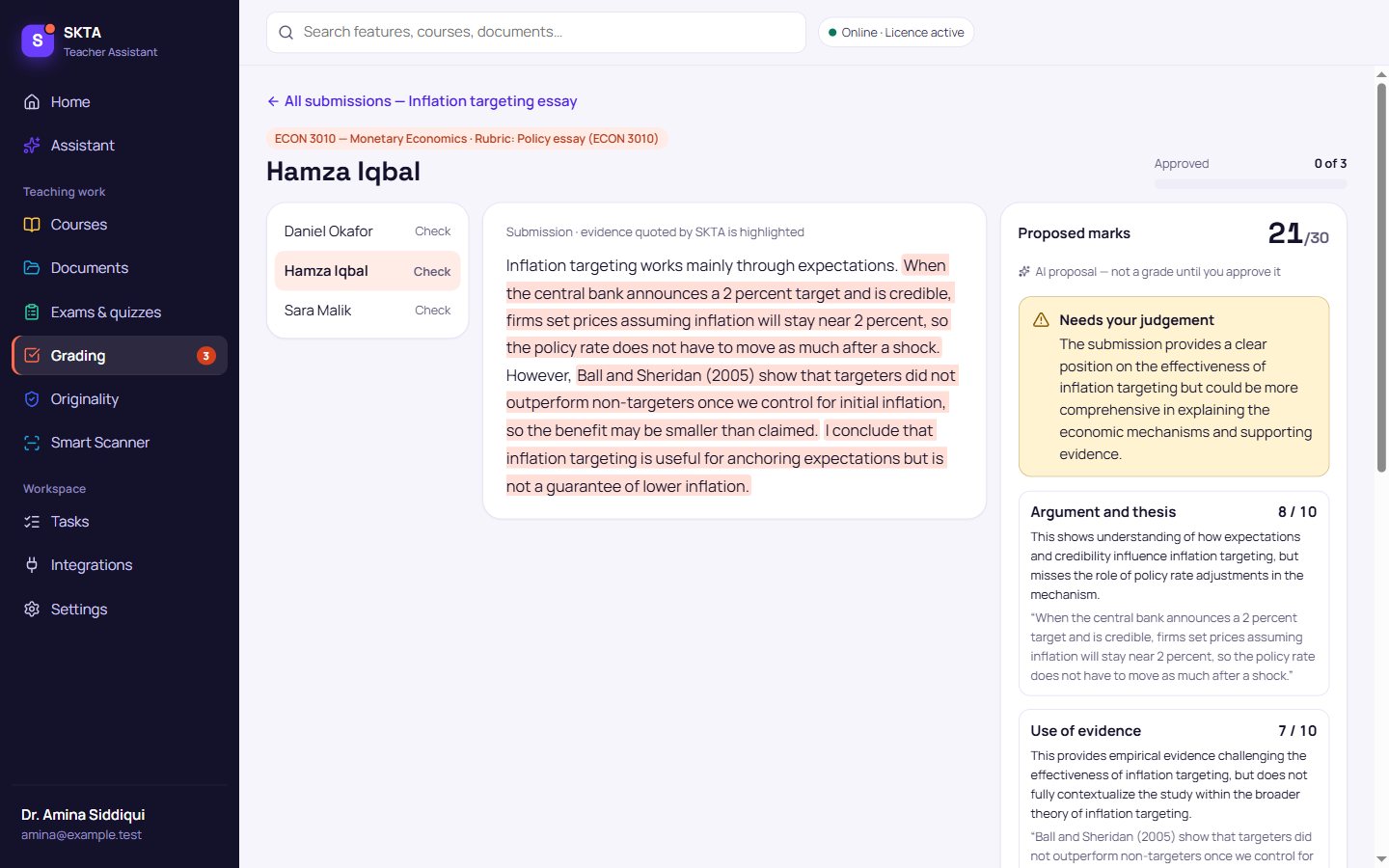
Marks per criterion, each backed by a quote from the student's work.
Approve and export
Change any mark, approve, and export the gradebook and feedback.
Grading
Marks you can defend.
SKTA proposes a mark for each rubric criterion and quotes the sentences it relied on. Uncertain cases are flagged for your judgement — nothing becomes a grade until you approve it.
- Evidence for every markQuoted from the submission, checked to exist.
- Your rubric, your decisionAdjust any score before approving; exports include approved grades only.
- Class analysisSee which criteria the whole group struggled with.
Lessons and lectures
Tomorrow’s class, planned from your own notes.
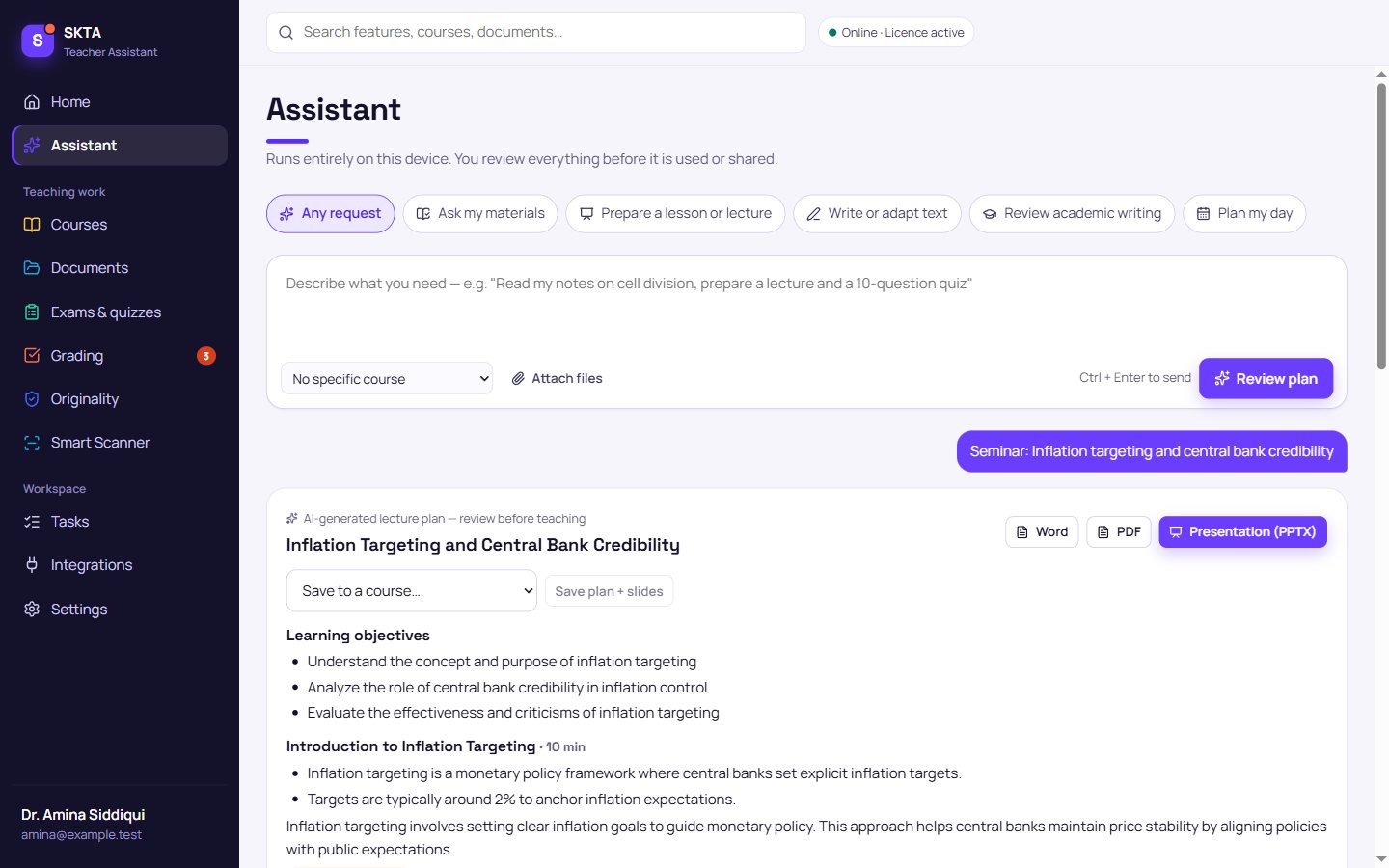
A timed plan with activities, discussion questions and checks for understanding — plus editable slides. SKTA cites the course files it used and says when they don’t cover something.
- School lessons to university seminarsPick the session type, length and level.
- Editable PowerPoint and WordReady to adjust in the tools you already use.
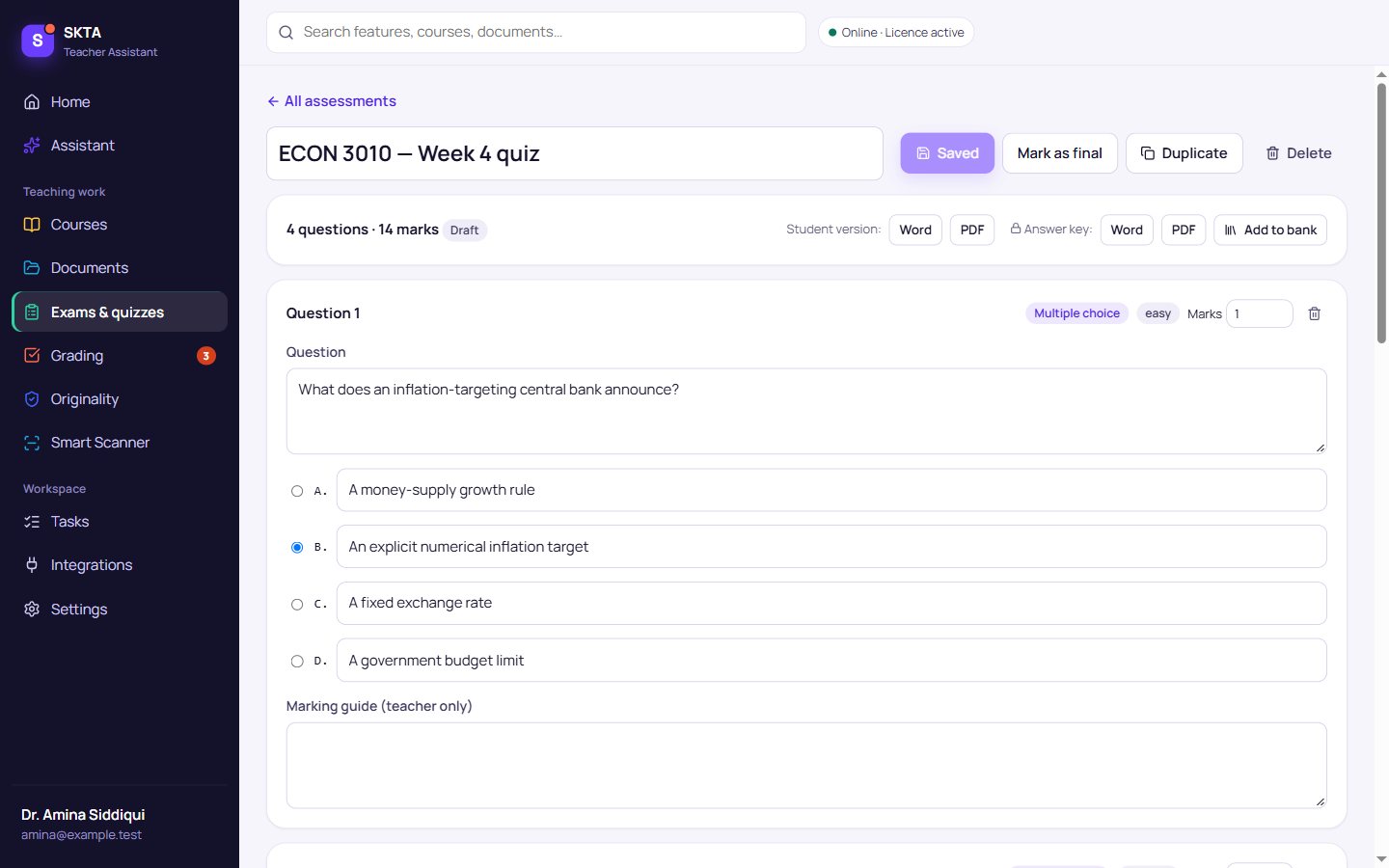
Exams and quizzes
Questions with the answer key already written.
Multiple choice, true/false, short answer and essay prompts from your materials, with automatic checks for invalid keys and near-duplicates. Export a student paper and a separate marking guide.
- Question bankKeep good questions and reuse them next term.
University research
Thesis feedback that stays honest.
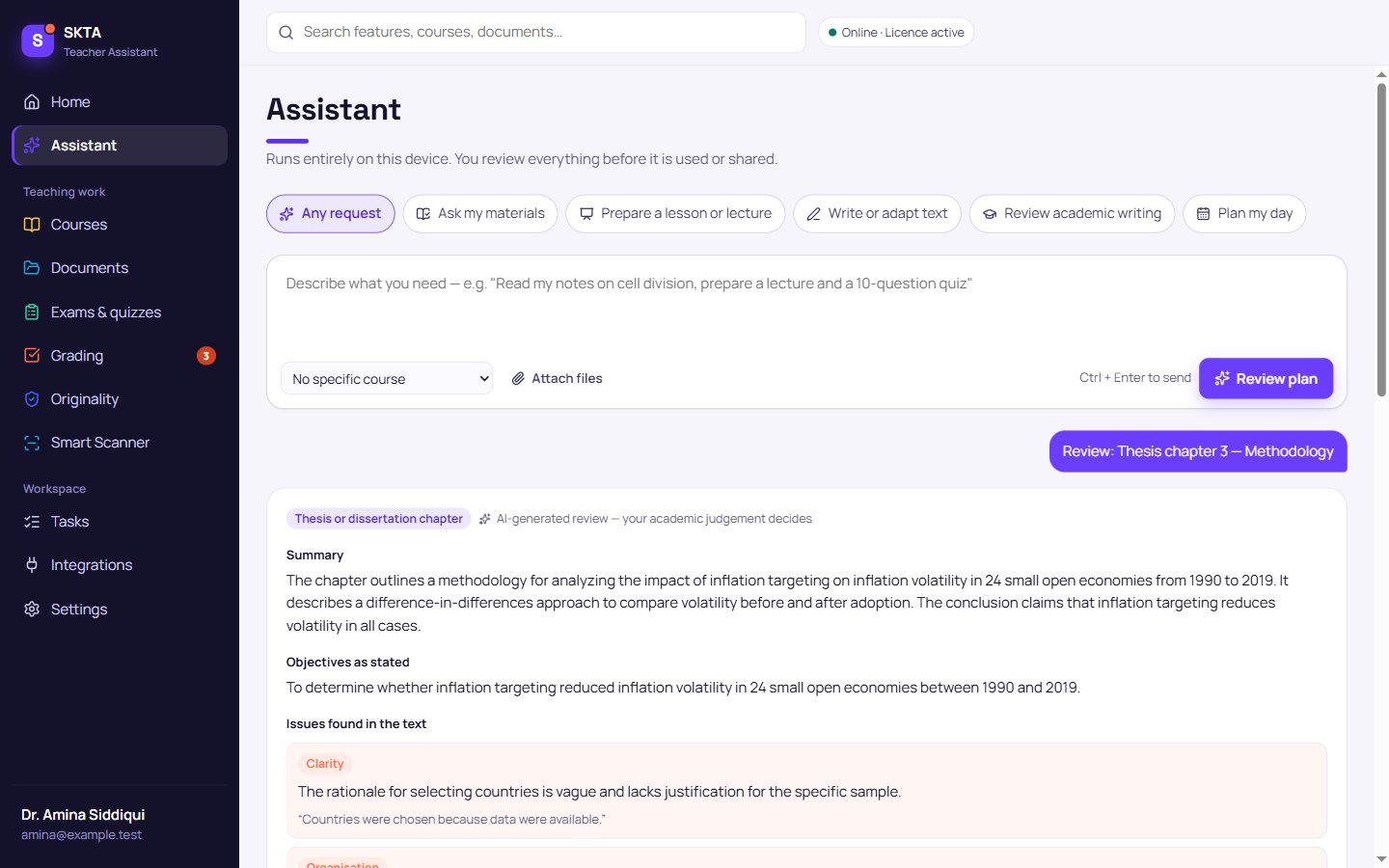
Structured feedback on proposals, thesis chapters and articles — clarity, methodology, argument, evidence and referencing in APA, MLA, IEEE or Harvard. Quotes are verified against the text, and references are never invented.
- Methodology and claimsSpots overclaiming, sampling gaps and weak causal language.
- Originality comparisonMatching passages between students and your sources — no “AI detector” guesswork.
Smart Scanner
Paper in. Checked text out.
Scan one page or a stack with your phone or webcam. SKTA finds the page, straightens it, removes shadows and reads it on the device. You compare every uncertain word with the original before using it.
Handwriting, formulas and diagrams are kept as images in the original pages and flagged — SKTA never fills in words it could not read.
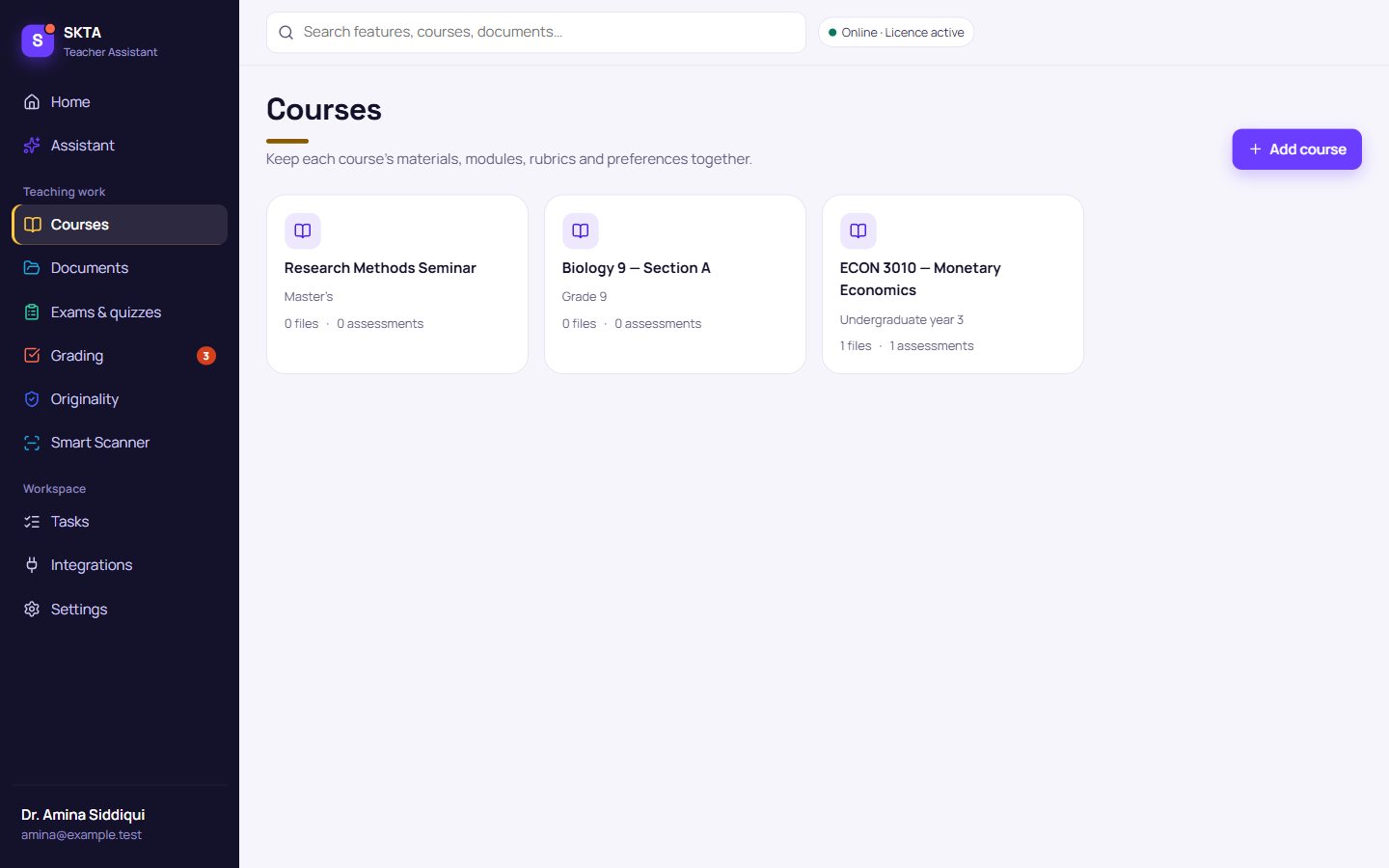
Courses and documents
Every course, its files and what SKTA remembers.
Keep materials, modules, rubrics and assessments together per class. Search inside PDF, Word, PowerPoint and Excel files, and see — and delete — what SKTA remembers about each course.
Privacy and local AI
Your students’ work stays on your device.
The AI model is downloaded once and works offline. Prompts, documents and grades are never sent to an AI service.
Every account and device is approved personally. SKTA only contacts its licensing service to confirm your access.
Export or delete everything from Settings. Access ending never deletes your courses or grades.
Devices
One SKTA on your laptop, tablet and phone.
Windows
- Windows 10 or 11, 64-bit
- 8 GB RAM (16 GB recommended)
- About 3.5 GB free space
Android
- Android 9 or later, 64-bit (ARM)
- 6 GB RAM (8 GB+ recommended)
- About 3 GB free space
Mac · Apple Silicon
- M1, M2, M3 or M4
- macOS 12 or later, 8 GB RAM
- AI accelerated with Metal
Mac · Intel
- Intel processor, 64-bit
- macOS 12 or later, 8 GB RAM
- AI runs on the processor
The 7-day demo
Seven full days, starting when you’re approved.
- 1Request access, then download SKTA from your private folder.
- 2Create an account in the app.
- 3Confirm your email from no-reply@skta.uk.
- 4We approve your account personally.
- 5Your 168-hour demo starts. Your work is kept afterwards.
Pricing
Simple plans for teachers and institutions.
Monthly
- Everything in SKTA
- On-device AI, no usage limits
- Windows, Android and Mac
Annual
About $7.42 a month.
- Everything in Monthly
- Approved updates for the year
Institutions
- Schools, colleges and universities
- Department and campus licences
- Onboarding for staff
SKTA is in private beta: purchases are not open yet. Start with the free 7-day demo; we’ll contact you before any paid plan begins.
Questions
Good to know.
Is my students’ work uploaded anywhere?
No. The AI runs on your own device. SKTA’s licensing service receives only your email, an installation ID and public key, device name, platform and SKTA version — never documents, prompts or grades.
Does SKTA decide grades?
No. SKTA proposes marks with quoted evidence and flags uncertain cases. A mark only counts when you approve it, and you can change any score first.
Why do I need approval after signing up?
During the private beta every account and device is approved personally. Signing up and confirming your email never grants access on its own.
Does it work offline?
Teaching work and the AI run offline. SKTA confirms your access with its licensing service at start-up and regularly while open; if it can’t, your files stay safe and it reconnects by itself.
Why does Windows or macOS show a warning when installing?
SKTA is not yet signed with paid commercial certificates, so Windows SmartScreen and macOS Gatekeeper ask you to confirm. The download page shows each step and the file’s SHA-256 fingerprint so you can check it.
Can SKTA read handwriting and formulas?
Printed text is read reliably. Handwriting, formulas, tables and diagrams may not be; they always stay visible in the original page and uncertain words are highlighted for you to check.
Is SKTA on the app stores?
Not yet. During the private beta we share the installers personally: request access on this website and we share the private SKTA Downloads folder with your Google account. Never install SKTA from anywhere else.
Request access and support
Talk to a person.
Questions, institutional quotations or help with installing — email skta.klyra@gmail.com or send a message. Most replies arrive within one working day.
Already have an account? Sign in inside the SKTA app — your work lives on your device, so there is no web login.